

Arduino Morse Code Decoder Using Microphone and 20×4 LCD—Complete Guide
Build an Arduino-based Morse Code Decoder that can automatically detect and decode Morse signals using a microphone sound sensor. The system recognizes short and long audio signals as dots (.) and dashes (-), converts them into readable letters, numbers, and punctuation, and displays the decoded message on a 20×4 I²C LCD.
The project uses an Arduino Nano, a digital-output microphone module, and a 20×4 I²C LCD. It also features adaptive timing to recognize Morse signals at different speeds.
Arduino Morse Code Decoder – Source Code & Diagram
Required Libraries:
- Wire.h
- LiquidCrystal_I2C.h
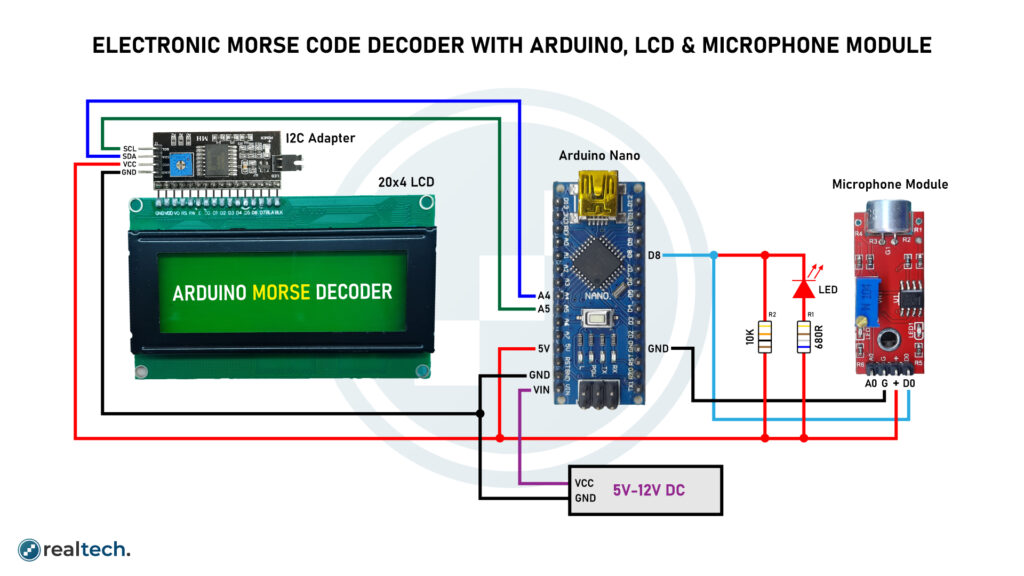
Arduino Connections:
- Microphone OUT → D8
- Microphone VCC → 5V
- Microphone GND → GND
- LCD SDA → A4
- LCD SCL → A5
- LCD VCC → 5V
- LCD GND → GND
Complete Diagram:
Arduino Code:
#include <Wire.h>
#include <LiquidCrystal_I2C.h>

LiquidCrystal_I2C lcd(0x27, 20, 4);

int audioPin = 8;
int audio = 1;

int LCDline = 1;
int lineEnd = 20;
int letterCount = 0;
int lastWordCount = 0;
int lastSpace = 0;

char currentLine[21] = "                    ";
char lastWord[21] = "                    ";
char line1[21] = "                    ";
char line2[21] = "                    ";
char line3[21] = "                    ";

boolean ditOrDah = true;
int dit = 10;

int averageDah = 240;
int averageWordGap = averageDah;
long fullWait = 6000;
long waitWait = 6000;
long newWord = 0;

boolean characterDone = true;
int downTime = 0;
int upTime = 0;
int myBounce = 2;

long startDownTime = 0;
long startUpTime = 0;
long lastDahTime = 0;
long lastDitTime = 0;
long averageDahTime = 0;

boolean justDid = true;
int myNum = 0;

char mySet[] = "##TEMNAIOGKDWRUS##QZYCXBJP#L#FVH09#8###7#####/-61#######2###3#45";
char lcdGuy = ' ';

void setup() {
  pinMode(audioPin, INPUT);
  pinMode(13, OUTPUT);

  lcd.init();
  lcd.backlight();
  lcd.clear();
  lcd.setCursor(0, 0);
  lcd.print("MORSE  CODE  READER ");
}

void loop() {
  audio = digitalRead(audioPin);

  if (!audio) keyIsDown();
  if (audio) keyIsUp();
}

void keyIsDown() {
  digitalWrite(13, 1);

  if (startUpTime > 0) startUpTime = 0;
  if (startDownTime == 0) startDownTime = millis();

  characterDone = false;
  ditOrDah = false;
  delay(myBounce);

  if (myNum == 0) myNum = 1;
}

void keyIsUp() {
  digitalWrite(13, 0);

  if (startUpTime == 0) startUpTime = millis();

  upTime = millis() - startUpTime;
  if (upTime < 10) return;

  if (upTime > (averageDah * 2)) printSpace();

  if (startDownTime > 0) {
    downTime = millis() - startDownTime;
    startDownTime = 0;
  }

  if (!ditOrDah) shiftBits();

  if (!characterDone) {
    if (upTime > dit) {
      printCharacter();
      characterDone = true;
      myNum = 0;
    }
    downTime = 0;
  }
}

void shiftBits() {
  if (downTime < dit / 3) return;

  myNum = myNum << 1;
  ditOrDah = true;

  if (downTime < dit) myNum++;
  else {
    averageDah = (downTime + averageDah) / 2;
    dit = averageDah / 3;
    dit = dit * 2;
  }
}

void printCharacter() {
  justDid = false;

  if (myNum > 63) {
    printPunctuation();
    return;
  }

  lcdGuy = mySet[myNum];
  sendToLCD();
}

void printSpace() {
  if (justDid) return;
  justDid = true;

  averageWordGap = ((averageWordGap + upTime) / 2) + 20;

  lastWordCount = 0;
  currentLine[letterCount] = ' ';
  lastSpace = letterCount;

  for (int i = 0; i < 20; i++) lastWord[i] = ' ';

  lcdGuy = ' ';
  if (letterCount < 20) sendToLCD();
}

void printPunctuation() {
  switch (myNum) {
    case 71: lcdGuy = ':'; break;
    case 76: lcdGuy = ','; break;
    case 84: lcdGuy = '!'; break;
    case 94: lcdGuy = '-'; break;
    case 97: lcdGuy = '\''; break;
    case 101: lcdGuy = '@'; break;
    case 106: lcdGuy = '.'; break;
    case 115: lcdGuy = '?'; break;
    default: lcdGuy = '#'; break;
  }
  sendToLCD();
}

void sendToLCD() {
  if (lcdGuy > ' ') {
    lastWord[lastWordCount] = lcdGuy;
    if (lastWordCount < lineEnd - 1) lastWordCount++;
  }

  currentLine[letterCount] = lcdGuy;
  letterCount++;

  if (letterCount == lineEnd) newLine();
  else lcd.print(lcdGuy);
}

void newLine() {
  if (lastSpace == 0) {
    lastWord[0] = lcdGuy;
    lastWordCount = 1;
  }

  truncateOverFlow();
  linePrep();
  reprintOverFlow();
}

void truncateOverFlow() {
  if (lastSpace == 0) return;

  lcd.setCursor(lastSpace, LCDline);
  letterCount = lastSpace;

  for (int i = lastSpace; i < 20; i++) {
    lcd.print(' ');
    currentLine[i] = ' ';
  }
}

void linePrep() {
  LCDline++;
  if (LCDline == 4) {
    LCDline = 3;
    myScroll();
  }
}

void myScroll() {
  lcd.setCursor(0, 0);
  lcd.print(line1);

  for (int i = 0; i < 20; i++) line1[i] = line2[i];

  lcd.setCursor(0, 1);
  lcd.print(line1);

  for (int i = 0; i < 20; i++) line2[i] = line3[i];

  lcd.setCursor(0, 2);
  lcd.print(line2);

  for (int i = 0; i < 20; i++) line3[i] = currentLine[i];
}

void reprintOverFlow() {
  for (int i = 0; i < 20; i++) currentLine[i] = lastWord[i];

  lcd.setCursor(0, LCDline);
  lcd.print(lastWord);

  letterCount = lastWordCount;
  lcd.setCursor(letterCount, LCDline);
  lastSpace = 0;
  lastWordCount = 0;
}
Note: This is the original microphone-based Morse decoder sketch. It expects the microphone module to provide an active-LOW digital output when sound is detected. The LCD I²C address is configured as 0x27.
Important: Adjust the potentiometer on the microphone module to set the appropriate sound detection sensitivity. Make sure the module reliably detects the Morse audio signals without triggering from unwanted background noise.